


Key Takeaways
- Case management software for schools brings incident reporting across departments, documentation, and communication into one place.
- Streamlining student incident workflows helps ensure deadlines are not missed and cases continue to move forward.
- Handling communication inside a case management platform keeps all parties informed and tracks every detail securely.
- A streamlined workflow keeps a district prepared for audits, prioritizes student safety, and builds trust in the school community.
Week to week, school districts see reports come through involving Title IX, BIT/CARE assessments, or student conduct violations such as bullying. These involve deadlines, documented evidence, communication, meetings, and supportive measures.
When those pieces are disconnected across emails, shared drives, spreadsheets, or physical files, it’s difficult to stay in compliance and equipped to build trust. This guide explores how districts are streamlining their incident workflows to respond to incidents with confidence and accountability.
Why Cases Stall and Deadlines Get Missed
When a case stalls, it’s because stages of the workflow are disconnected. Without a centralized view of each stage, deadlines slip by.
Districts without a streamlined workflow may experience these issues:
- A student emails a report to a staff member, but the staff member is unavailable, and the report sits without a timely response.
- There is no consistent way to log incidents across departments, making it difficult to identify patterns.
- Deadlines are added to a single staff member’s calendar, emailed, or listed in documents, without a clear way to stay in compliance.
- Evidence and case notes are scattered across inboxes, drives, and paper files, creating issues for potential audits.
- Communication timestamps with students, families, and legal representation are not recorded in one place, making it difficult to track.
Any of these can stall a case or create K-12 school compliance problems. A district team handling incidents prioritizes protecting students, but a disconnected process leaves students without the response they deserve.
What a Streamlined Incident Workflow Looks Like in Five Steps
Many school districts are leaving behind disconnected processes to improve their response to incidents. Here are five ways districts now streamline their K-12 incident workflow.
1. Standardize Reporting Intake
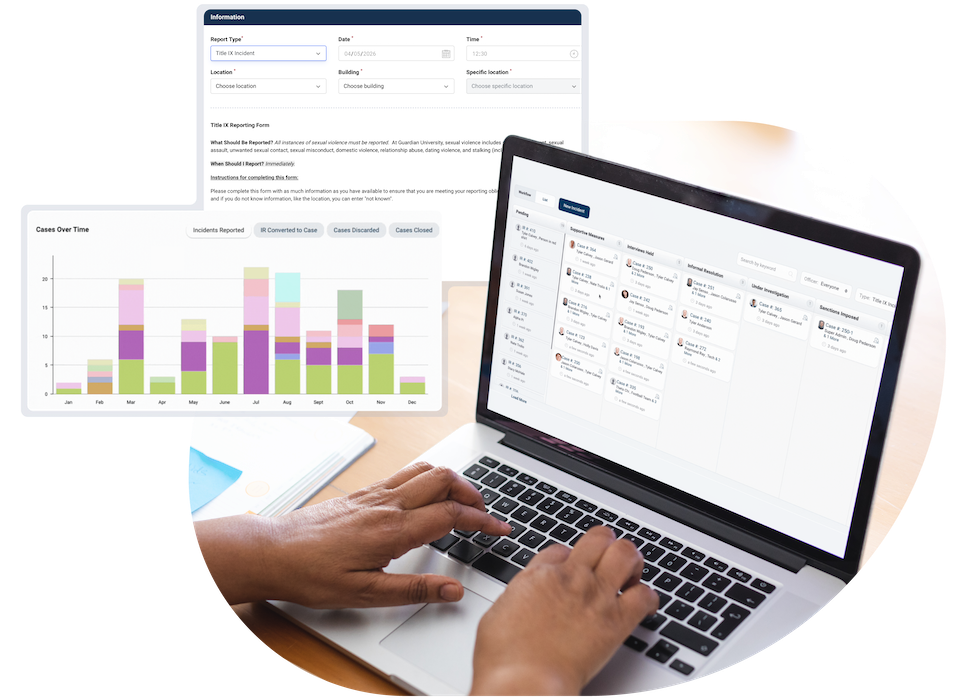
The first way districts streamline their process is by taking incident reports through one platform. Instead of asking students to email a staff member or submit paper forms or Google Forms, districts are setting up forms in a case management platform for schools. This creates a consistent and secure reporting process to share with students, families, and staff members.
2. Provide a Centralized Platform to All Departments
Instead of departments managing incidents their own way, districts are now providing all departments with one platform, whether it’s for Title IX, a student conduct incident, or a threat report sent to BIT/CARE teams. A centralized case management platform allows departments to collaborate and gives them one secure system for every type of incident.
3. Give Staff Role-Based Access
When districts use a centralized platform, departments can collaborate, and districts can give them a level of access based on their role. A school counselor, a Title IX coordinator, a student safety officer, or the BIT/CARE team see only the information their role requires. They can all send communication, schedule meetings, be alerted to deadlines, and add documentation based on their level of access. Sensitive details stay visible only to the people who should see them.
4. Track Documentation and Supportive Measures in One Place
Another way K-12 districts are streamlining incident workflows is by keeping documentation and evidence in one place. Notes, statements, uploaded files, and supportive measures attach to the case they belong to, rather than being scattered in a staff member’s inbox or a folder. This allows districts to track every piece of the case without misplacing information.
5. Keep Communication Logged and Secure
A case involves people other than the district team members working on it. The person who reported, their family, the responding party, and legal counsel all need to be kept informed. Any communication with them needs to be logged.
Instead of handling communication through email, districts are using case management software to communicate with all those involved with the incident. Communication details are logged in one platform, so the district can show who was notified and when. Plus, the people involved only see the communication that is sent to them, so details stay private.
Seeing Student Safety Patterns Across a District
Managing Title IX, student conduct, and BIT/CARE incident reports in school administrative software connects student records. Instead of reports being tied to one department or school without visibility across a student’s history, a district can see what is happening with a student over time. By surfacing patterns, student safety tracking gives the district team a chance to step in earlier.
For example, students move from elementary to middle to high school, and may be involved in incidents. Isolated incidents in separate school buildings might look minor, but when a team sees a recurring pattern in a case management platform, they can see that the student needs support.
Staying Audit Ready Without Scrambling
A district has to be ready for an audit related to any incident report, such as Title IX. Streamlining incident workflows prepares a district for the day that audit arrives. Because every part of the case is managed in place, a complete record is available for the Office of Civil Rights (OCR) or the complainant or respondent’s legal team.
There’s no need to scramble and search for notices, evidence, supportive measures, or interview transcripts. Everything lives in one place, so educational compliance management is automatically handled within the platform.
Choosing a Platform Built for Schools
The way a district responds to an incident report matters most and builds trust with stakeholders across the community. Streamlining incident workflows allows a district to respond to reports with confidence and handle student issues with care.
Guardian is case management software for school districts, helping you streamline workflows across departments so you can respond with confidence to every incident.
Built for education, it is designed to work the way your district works and is flexible enough to adapt to your processes.
Kim Kennedy, Title IX Coordinator for Indianapolis Public Schools says, “Guardian isn’t just a tool. It’s part of how we protect our students, support our staff, and stay accountable as a district.”
To see how Guardian can streamline your district’s incident workflows, request a demo.
See How Guardian Simplifies Case Management
One secure, configurable platform for Title IX, HR, and Student Services compliance.
Frequently Asked Questions
How do schools streamline case management and incident workflows?
Schools streamline incident workflows by standardizing the intake of reports, consolidating case types in one platform, and tracking all documentation and communication.
What causes schools to miss compliance deadlines without case management software?
Deadlines for Title IX and student cases get missed when there is not a reliable way to see what is due and when. When reports are sent to one person by email, deadlines are not automatically tracked, and case files are spread across email threads and drives, it’s difficult to stay compliant. Guardian’s case management software for schools solve this problem, making it easy for K-12 districts to track every part of the investigation and stay in compliance.
What is the best case management software for K-12 schools?
The best platform centralizes reporting, timelines, notifications, documentation, and communication with families and legal counsel. It also needs to be flexible and designed specifically for education. Guardian was built exclusively for education, with configurable workflows, role-based privacy, and a complete audit trail for every case. It gives K-12 districts one secure place to manage Title IX, behavioral intervention, and student conduct cases from intake through closure.
