


Quick answer
The best school case management software for K-12 districts offers incident reporting, configurable workflows, deadline tracking, analytics, and a full record of each case. Guardian offers all of this, providing districts with a secure platform to manage Title IX, bullying, threat assessment, and HR cases.
Many districts manage Title IX, bullying, threat assessments, and HR cases with separate tools. Reports come through Google Forms or email, and cases are documented in spreadsheets, shared drives, or separate platforms. The challenge is that when information is spread across all of them, it’s hard to respond consistently, spot patterns in student behavior, or identify recurring employee issues.
The best school case management software brings every type of report, case, and request into one platform. In this blog post, we compare the main options for K-12 and how to evaluate tools to find the best one for your district.
What’s Happening in K-12 Case Management
Currently, there are four areas that are affecting how districts manage cases to protect students, provide them with the support they need, and follow regulations.
The Final Title IX Rule and Investigations
On Sept. 29, 2026, the U.S. Department of Education published a final rule that reinstates the 2020 Title IX regulations. K-12 public schools have followed the 2020 rules since January 2025, but the department formally reinstated them on record. Our guide to Title IX workflows explains what Title IX teams should be aware of as they intake reports and follow each stage of the process.
The Department of Justice (DOJ) and the Office for Civil Rights (OCR) are also currently investigating several K-12 school districts on how they handle Title IX compliance.
Threat Assessment Requirements
Schools must identify and address safety concerns related to the threat of violence. Through behavioral threat assessment and management (BTAM), K-12 schools manage reports, conduct assessments, and implement interventions. School principals are often overwhelmed trying to manage reports that come in on top of other duties.
Budget Pressure
Districts across the U.S. are working with shrinking budgets, but they still have a duty to prioritize student safety and respond to reported incidents. Having to pay for separate tools to manage the variety of cases and employee requests that come through day to day is too much for many districts.
Six Types of School Case Management Tools
There are several types of tools that districts use to manage cases related to Title IX, bullying, threat assessments, and HR. Most districts choose between six options, and many use more than one.
Spreadsheets, Email, and Shared Drives
Spreadsheets, email, and shared drives are cost-effective, and most staff members know how to use them. If a small school manages a low number of cases, they could make these tools work. But there’s not a guarantee that these tools will protect sensitive information and student data, making the schools open to audits or litigation.
For larger schools or districts, it can become complicated to manage cases with spreadsheets, email, and shared drives. Team members have to stay on top of deadlines and communication, and if someone asks for a case history, it’s a challenge to pull together every piece of documentation. In our webinar, The Hidden Cost of Spreadsheets in Education Case Management, we discuss why spreadsheets have limits in case management.
Student Information Systems
Many student information systems (SIS) have a discipline or behavior module where teachers can log behavior incidents, attendance issues, and referrals. While the SIS does track student records, they don’t handle employee cases or Title IX investigations.
Anonymous Reporting Apps
Anonymous reporting apps are an accessible, simple way to report student wellness concerns. Students and families can report their concern at any time without sharing their names. While the reports are sent to the right staff member quickly, the investigation, documentation, and follow-up are handled in another system.
Behavioral Threat Assessment Platforms
Threat assessment platforms guide school or district teams through structured assessment frameworks. Staff members document plans and interventions for students of concern and monitor progress. Title IX and HR cases are usually managed in different systems.
Case Management Platforms From Other Industries
Some districts use case management software that is built for an industry outside of education. Since these platforms weren’t made for K-12, setting them up for education workflows, Title IX timelines, and student records access usually takes a lot of time and IT support.
Case Management Platforms for Education
Guardian is a case management platform designed specifically for K-12 and higher education. It is meant to handle sensitive issues related to education. Districts can manage incident reporting, investigations, documentation, and HR cases and employee requests in one secure platform.
How to Evaluate School Case Management Software
If your district is looking for a new way to manage student and employee cases, there are several components to consider.
Incident Reporting and Requests Through Forms
When it comes to incident reporting or employee requests, you need to be able to set up forms in your case management software. The intake form should be easy for students, families, or employees to fill out, accessible on a mobile device, and instantly route to the right staff member. Your teams should be able to easily set up different forms depending on the need, such as Title IX, threat assessments, bullying, accessibility concerns, and employee leaves of absence.
Workflow Automation
Every district handles a Title IX complaint, a bullying report, and an employee concern differently, depending on state regulations or district policies. School case management software should have configurable workflows and workflow automation that administrators can set up themselves without needing to submit a support ticket to the vendor.
Staying on Top of Deadlines
Coordinators and case managers shouldn’t have to track deadlines on their own calendars. The software should send automatic notifications and reminders, and document when steps have been completed.
Privacy and Access Controls
The best case management platform offers role-based access with controls that limit staff members to only the information they are authorized to see. Guardian allows team members across Title IX, HR, BTAM, student safety, and discipline to all use the platform but with access to records and workflows based on their role.
One Platform for Every Case Type
When Title IX, bullying, conduct, threat assessment, and HR cases are in one system, staff can connect information that is usually in separate tools. For example, when a district can clearly see that a student had incidents at an elementary school and now has one at the middle school, they can provide support that the student needs. Incident tracking across buildings helps identify patterns in student behavior and wellness, and allows for earlier interventions.
Reporting and Audit Trail
Every note, email, document, and decision should be logged with the date, time, and name of the person who made it, helping staff respond consistently and confidently. It also helps with state reporting, OCR audits and investigations, and gives general counsel a clear record of the case when needed.
Ease of Use
Another component to consider when choosing a case management platform is its ease of use. Can staff members start using it right away? Does it take a lot of training? Ask about implementation and ongoing support. If staff members have to send in a support ticket every time they want to change a workflow, they’re more likely to use spreadsheets and email. A platform that replaces several tools and saves staff time, though, may be worth it when your district budget is tight.
For a full checklist to use during demos, download The K-12 Case Management Software Evaluation Guide.
How Guardian Supports K-12 Case Management
Guardian, a case management platform built for education is trusted by more than 1,000 schools. K-12 school administration use Guardian to manage Title IX, bullying, threat assessment, and HR in one secure platform.
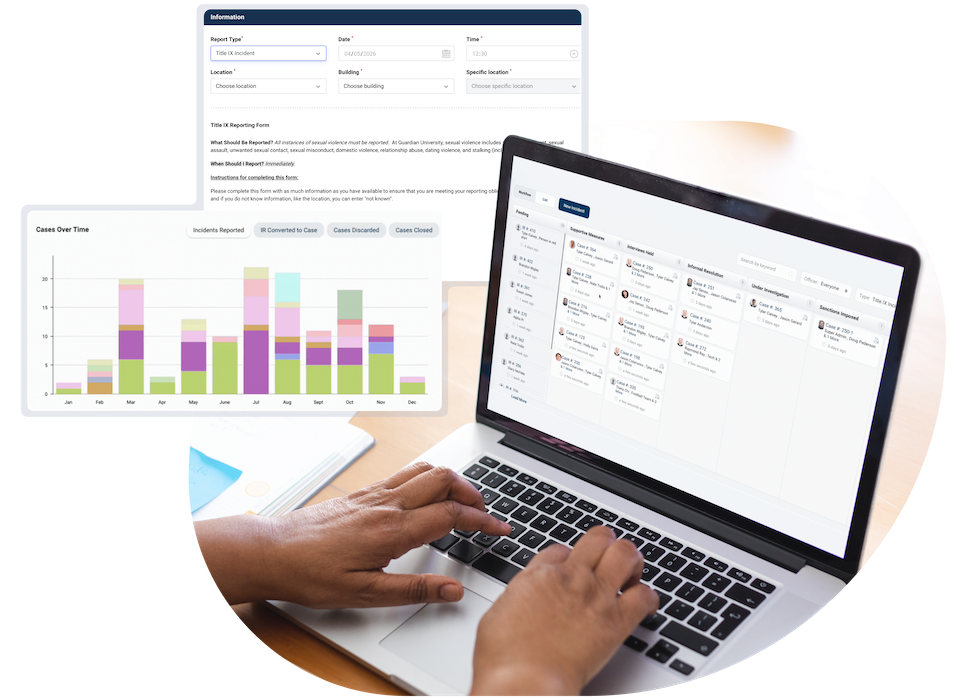
Teams can configure any number of forms for incident reports, concerns, or employee requests. Once a report is submitted, it is routed automatically to the appropriate district team member. Administrators can also build and change their own workflows with the drag-and-drop Workflow Wizard, so they can align with state or district policy.
Role-based access ensures each case is visible only to the people who should see it, including access for families, legal counsel, and outside investigators.
Every document, note, piece of evidence, notification, decision, and appeal is stored with the case, giving your district a full record of who was involved and when. Reporting and analytics help administrators track patterns and trends across the district.
How a district responds to a concern affects student, family, and staff trust. Guardian helps your team document each response and handle every case with confidence, consistency, and care.
See How Guardian Simplifies Case Management
One secure, configurable platform for Title IX, HR, and Student Services compliance.
Frequently Asked Questions
What is school case management software?
School case management software is a secure platform K-12 districts use to receive reports, investigate concerns, and document each step of a case. Platforms like Guardian bring incident reporting, case management workflows, and tracking for Title IX, bullying, threat assessment, and HR cases into one system.
How is case management software different from a student information system?
A student information system (SIS) manages records such as enrollment, grades, attendance, and classroom discipline. Case management software is designed for sensitive cases that include investigations, restricted access, compliance deadline management, and cases that involve employees.
What features should K-12 districts look for in case management software?
Districts should look for simple incident reporting, configurable workflow automation, automatic notifications and reminders, and role-based privacy controls. Guardian, for example, includes mobile incident reporting, a drag-and-drop Workflow Wizard, and secure role-based access.
Can case management software help with Title IX compliance?
Case management software helps Title IX coordinators track each stage of the investigation. In Guardian, each piece of evidence, communication, action, decision, and deadline is tracked and stored, creating a complete audit trail.
What case management software do K-12 districts use?
K-12 districts use a range of tools, including SIS behavior modules, anonymous reporting apps, threat assessment platforms, and comprehensive case management platforms. Guardian is an education case management platform trusted by schools for Title IX, bullying, threat assessment, and HR cases.
